USB drives are easy devices for storing and transferring data; yet, sometimes they face problems such as being unrecognizable, having an unknown file system, or requiring formatting.
When this happens, many users wonder whether formatting tools can actually repair a corrupted USB drive.
So, can GUI Formatter repair a corrupted USB drive?
Yes, certain forms of USB corruption, namely file system problems, can be resolved using GUI Formatter.
However, neither the lost files nor any physical damage to the device can be fixed using GUI Formatter.
GUI Formatter operates through the creation of a new file system for the USB drive that makes the drive usable even if it is corrupted.
It is helpful particularly when formatting USB drives to FAT32, even large USB drives that Windows has problems with.
Common Signs of a Corrupted USB Drive
Before trying any repair method, it helps to identify whether your USB drive is actually corrupted.
Some common signs include:
- USB Drive Shows as RAW: In general, Windows classifies drives into FAT32, NTFS, and exFAT. In case the file system gets corrupted, the drive appears to be RAW, which means that the operating system does not recognize the file system type.
- Files Are Missing or Cannot Be Opened: It may show your files; however, you will face problems with opening them or transferring them somewhere.
- Computer Asks You to Format the Drive: Sometimes the corruption of the file system makes Windows ask you to format the drive in order to read it.
- Slow Performance or Frequent Disconnects: The problem of a damaged file system can lead to poor performance of the USB drive, freezing, or sudden disconnection.
How GUI Formatter Helps Fix USB Drive Corruption?
The GUI formatter focuses on formatting, and not recovering the lost data. This makes the program easy to use.
Here is how it helps:
Creates a Fresh File System
A corrupted file system can prevent your computer from reading the USB drive correctly. Formatting replaces the damaged structure with a new one.
Supports FAT32 Formatting
One of the biggest advantages of GUI Formatter is its ability to format larger USB drives as FAT32.
Windows poses certain constraints when formatting large drives to FAT32, but GUI formatter makes the task easy.
Restores Compatibility
FAT32 is widely supported by:
- Windows computers
- Mac systems
- Gaming consoles
- Smart TVs
- Cameras
- Other storage devices
This makes it a great choice when you want your USB drive to work across multiple platforms.
How to Repair a Corrupted USB Drive Using a GUI Formatter?
Follow these steps to restore your USB drive:
Step 1: Backup Important Data
Before formatting, check whether you can access your files. If the data is important, recover it first.
Step 2: Connect Your USB Drive
Insert your USB drive into your computer and make sure Windows detects it.
Step 3: Open GUI Formatter
Run GUI Formatter and also choose the USB flash drive that you wish to setup to make use of in the device.
Always double-check the drive letter to avoid formatting the wrong device.
Step 4: Select FAT32 Format
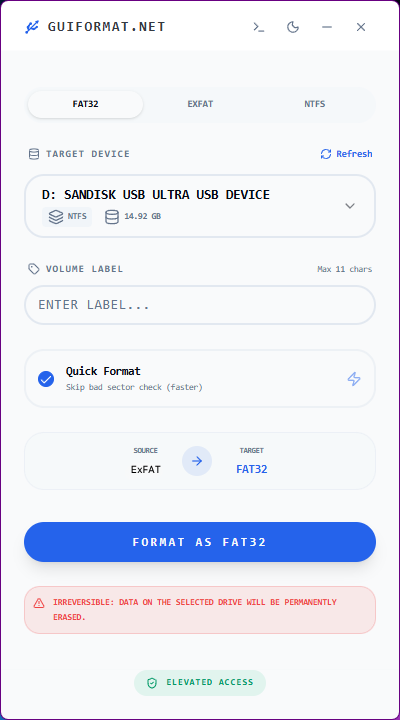
Select the file system FAT32. Better device compatibility is the result of this.
Step 5: Start Formatting
Start the Formatting, hold on for it to complete, and do not remove the USB flash drive.
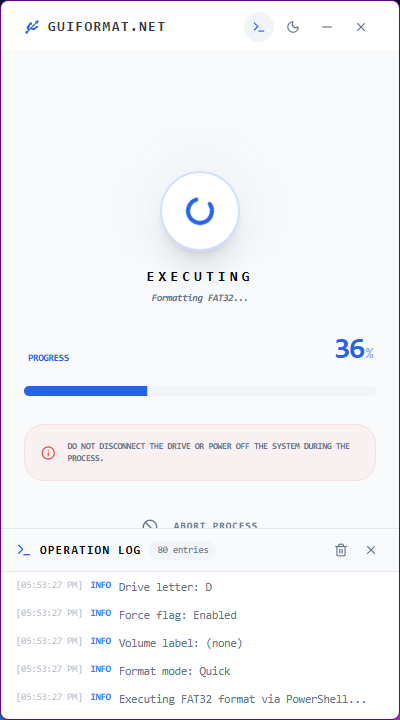
Step 6: Test the USB Drive
Once it is successfully formatted, place a couple of files on the USB drive and check to see whether it works properly or not.
Tips to Prevent USB Drive Corruption
These are some ways of minimizing the chances of USB corruption:
- Always Safely Remove USB Drives: Removing a drive during file transfer can damage the file system.
- Avoid Interrupting Transfers: Never disconnect the USB drive when copying or transferring data.
- Keep Backup Copies: Important files should never exist in only one location.
- Scan for Malware: Viruses can damage files and storage devices.
- Use Reliable USB Drives: Low-quality storage devices are more likely to fail.
Final Thoughts
So, can GUI Formatter repair a corrupted USB drive?
Yes, when the problem comes from file system corruption. GUI Formatter can restore many unreadable USB drives by creating a clean FAT32 file system and making them usable again.
Nonetheless, one should know the shortcomings of this tool. The program is not capable of recovering lost data from a USB drive or fixing a physically damaged flash drive.
If your USB drive is detected but corrupted, unreadable, or difficult to format, using GUI Formatter can be a simple and reliable way to bring it back into working condition.